Web & product / Tools & Utilities
Product Feed Parser
Feed files shouldn't need an engineer.
Web & product · Tools & Utilities · 2026
9 min read
- Year
- 2026
- Role
- Solo – UX/UI design and engineering
- Context
- A zero-install browser workspace for inspecting, auditing and exporting product data feeds, shaped by a decade of feed friction in rich media production.
- Outcome
- Shipped as a live client-side tool with parsing, feed-health auditing, inline editing and XML, JSON and Excel exports.
At a glance
Overview
Product Feed Parser is a single-page application that runs entirely in the browser. Drop in a URL or upload a file, and within seconds you have a searchable, editable, exportable view of your data – with no login and no backend of its own. Uploaded files are parsed on your device; fetching a feed from a URL makes network requests to that address.
The core bet: if you remove every barrier to entry – install, auth, server round-trips – the people who actually need the tool will use it. This case study walks through the problem, the two-mode design that makes it work, and the technical decisions that hold it all in one browser tab.
Role
Solo – UX/UI design and engineering
Live tool
Inspect a product feed in your browser
Load a URL or upload a file to parse, audit, edit and export product data without an account or installation.
Try the live toolThe problem
Anyone who has worked in digital advertising, e-commerce or content operations knows the friction of product feed files. These XML, JSON and Excel documents – sometimes tens of thousands of rows – are the connective tissue between a merchant's catalogue and every downstream channel: comparison shopping engines, ad platforms, affiliate networks, marketplaces.
When something breaks – a feed stops ingesting, a creative team can't see the assets, an engineer needs to diff yesterday's version against today's – the standard toolkit looks like this:
- Open the file in a text editor, and hope it's not 80 MB of minified XML
- Paste a fragment into a browser tab to pretty-print it
- Write a one-off Python or Node script to pull out the fields you need
- Email IT for access to the platform's admin panel
- Wait
Every step adds latency. Every handoff loses context. And the people who most need to understand the data – designers checking creative assets, campaign managers checking field completeness – often can't use any of those tools at all.
This is a solved problem waiting for the right interface.
Two users, one toggle
The app is designed around two distinct users who often sit in the same room but need completely different things from the same data.
The Designer
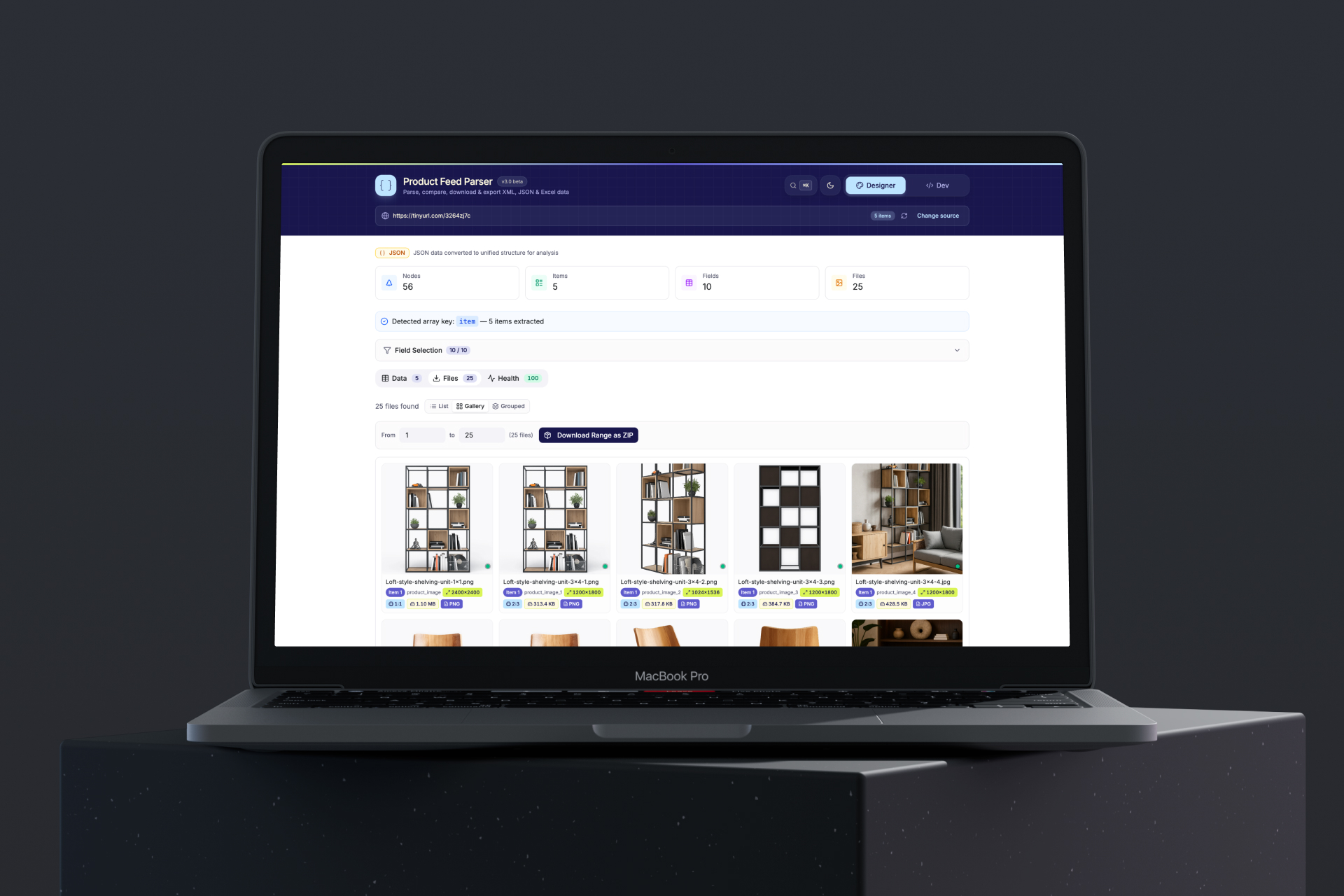
The Designer needs to answer one question quickly: do the assets look right? They want to see thumbnails, spot broken images, check aspect ratios, and preview how a product looks with its full metadata together. They do not want to see XML tags or diff algorithms.
The Developer
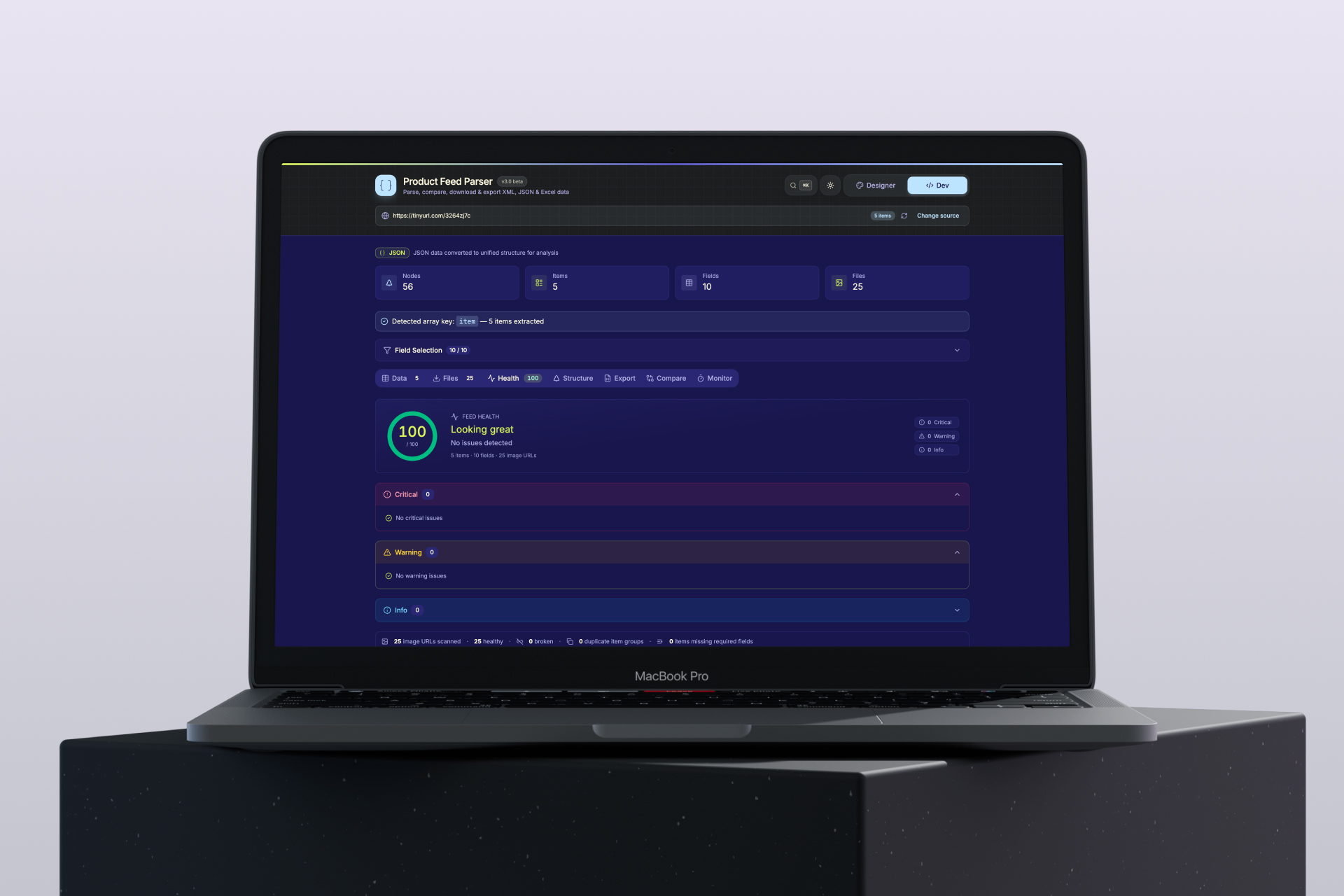
The Developer needs to answer a different question: what is the feed actually doing? They want structural inspection, field-level completeness, change tracking, automated monitoring, and clean exports they can hand to another system.
Rather than compromise both experiences into one cluttered interface, the app splits on a single toggle – Designer and Dev mode – that restructures the entire tab set. Same data. Different lens. One D keypress to switch.
What the MVP proves
Parsing is not the hard part – presentation is.
Every parse library solves the same structural problem. What this project proves is that turning a raw XML document into something a non-technical user can reason about – thumbnail grid, health score, field chips, type inference – is a genuine product problem, not a solved engineering one. The app auto-detects repeating elements, infers field types (image URL, currency, date, boolean, number, text), maps product roles (title, price, availability, brand, SKU, image) from field names, and presents it all without asking the user to configure anything.
Zero-backend is a real architecture, not a limitation.
All parsing, diff computation, ZIP assembly, Excel generation and color palette extraction run on the client. Two workflows touch the network: loading a feed by URL tries a direct request first and, if the host blocks cross-origin access, falls back to a chain of public third-party CORS proxies – in that case the feed address and its contents pass through that proxy – and image probing requests each image from its own host. If every proxy is blocked, the tool degrades gracefully to the file-upload path. For feeds with unreleased product data, uploading the file keeps its contents off any server; beyond that, there is no account-creation friction and no infrastructure cost to scale.
Inline editing bridges the gap between inspection and action.
The most frequent request in feed tooling is "I can see the problem – can I just fix it here?" This MVP answers yes. Every cell in the data table is editable, every change is tracked in a diff buffer, and every export format (XML, JSON, Excel) reflects those edits. The round-trip from "I see the broken value" to "I have a fixed file ready to upload" is measured in seconds, not days.
Feed health is actionable, not just decorative.
A lot of tools offer dashboards. Few make the dashboard navigable. The Health tab's 0–100 score is backed by real image probing – each discovered URL is fetched, its dimensions measured, its aspect ratio classified, its HTTP status checked. Clicking any issue jumps directly to the affected row and field. The score is not a metric to monitor; it is a shortcut to the next action.
The right scope for the right moment.
The app does not try to be a feed management platform. No user accounts, no saved workspaces, no scheduled jobs, no rule engine. It is a sharp tool for a specific job: you have a feed, you need to understand it or fix it, right now. That constraint is a feature – it is why the entire workflow fits in a browser tab with no onboarding.
Engineering detailsTechnical deep-dive
Technical highlights
Client-side architecture
- React 18 + TypeScript with Vite 6, deployed as a static bundle on my own domain
- No backend, no database, no auth layer – the URL bar is the API
- AbortController for cancellable fetches – every in-flight network request can be stopped cleanly without a page refresh
- CORS fallback chain – direct fetch first, then public proxies in sequence, stopping on first success; a transparent progress UI shows which hop is active
Data layer
- XML parsed via native browser DOMParser
- JSON parsed with automatic repeating-key detection for nested structures
- Excel / CSV via SheetJS with multi-sheet workbook support
- All three formats surface through a single unified type: items, allFields, stats, repeatingTag
Feed diffing
- Identifier resolution algorithm: prefers known ID-like field names (id, sku, gtin, ean), falls back to any field with all-unique values
- O(n) map-based diff with three output categories: added, removed, changed (with per-field old/new pairs)
Image probing
- Parallel image load + HEAD request per discovered URL, 6 s timeout
- Checks: URL validity, HTTP/HTTPS mismatch, load failure, tracking pixel (≤4px), undersized (<100px), oversized (>4000px), non-standard aspect ratio
- Standard ratios checked within 3% tolerance: 1:1, 4:3, 3:4, 16:9, 9:16, 3:2, 2:3, 21:9, 5:4, 4:5
Export pipeline
- XML regenerated from parsed items using original tag names, values XML-escaped
- JSON serialised from the same item array
- Excel: two-sheet workbook (data + summary metadata) via SheetJS
- Bulk image ZIP: parallel fetch with CORS fallback, JSZip assembly, streamed download with progress and ETA
- All formats apply the inline edit diff buffer before serialising
Accessibility
Designed for keyboard-first operation throughout:
- Full ARIA dialog pattern (focus trap, save/restore) on the command palette and image lightbox
- role="tree" / role="treeitem" with keyboard expand/collapse on the XML tree
- role="combobox" / role="listbox" / role="option" pattern on the command palette search
- aria-pressed on all toggle buttons, aria-expanded + aria-controls on all disclosure patterns
- focus-visible rings on every interactive element
- Screen reader live region on the lightbox zoom level
Design decisions worth noting
Two-mode toggle over progressive disclosure.
Progressive disclosure (hiding advanced features behind "More" links) tends to produce interfaces where experts spend time hunting and beginners still see too much. A hard mode split with a persistent toggle gives each user a clean surface and makes the switch cost zero – one keypress.
The command palette as the power-user interface.
Rather than expose every action in the primary UI, the app uses ⌘K to open a fuzzy-searchable palette of all available commands. This keeps the visual interface clean while giving keyboard-fluent users complete control. The palette doubles as a discoverability surface: every shortcut key is listed next to its action.
Escape as the universal exit.
Every blocking surface – command palette, image lightbox, item preview, search input – responds to Escape. The search input implements a two-step pattern: first Escape clears the text, second Escape blurs the input and restores global keyboard shortcuts. This matches the mental model of every other search interface.
Toast feedback over modal confirmations.
Every completed action provides immediate, non-blocking feedback via a bottom-center toast stack. The only modal confirmation is a deliberate exception before rendering very large tables (feeds >2,000 items), where an accidental click could freeze the browser.
Quality dots over status columns.
Rather than adding a "Status" column to the data table, image quality is surfaced as a small colored dot in the corner of every thumbnail. Green = good, amber = questionable, red = broken. The detail is one click away (Item Preview → Health tab), but the thumbnail view stays clean.
Interface showcase
The views below show the shipped Product Feed Parser interface – where inspecting, auditing and exporting come together.
What a v2 would build on
The prototype establishes the core loop – parse, inspect, audit, edit, export – at a level of quality that is already useful in production workflows. A second version could invest in:
- Persistent workspaces via localStorage snapshots or a lightweight cloud sync, so you can return to a partially edited feed
- Rule-based validation – required fields, allowed values and minimum image dimensions per feed type (Google Shopping, Meta Catalog, Bing Shopping), with the health check run against those rules
- Scheduled monitoring beyond the single-tab auto-refresh – alerts when the feed health score drops
- Side-by-side image comparison in the lightbox – current vs. previous version of the same image URL
- Bulk field transforms – find-and-replace across a field, URL rewriting, price rounding – extending the inline edit system to multiple rows at once
None of these require rearchitecting what is already built. They are layers on top of a foundation that already handles the hardest parts: parsing arbitrary formats, probing images, diffing data, and generating valid exports.
Why this matters beyond the tool itself
Product feed quality is a proxy for catalogue health. When images are broken, when required fields are missing, when duplicate rows inflate impression counts, the downstream effects compound: ads fail to serve, CPC goes up, product discovery degrades. The teams who care about these metrics rarely have the tools to investigate them directly – they rely on reports generated hours later by platform dashboards that tell you something went wrong, but not what, or where.
This tool closes that loop in seconds, in the browser, for anyone on the team. That is the prototype hypothesis. The evidence is already there – it works, and it is live.
Try the live tool (opens in a new tab)